Down But Not Out
We use a special internal version of Aerx's awesome mod Down But Not Out.
Downs
When you are downed by zombies or damage, you go down and can be revived by another for the next 5 minutes. You cannot revive yourself. You can choose to give up and take the death.
Deaths
When you die, you drop all your belongings and are teleported to your spawn location with a Wound moodle as well as injuries. Wound moodles disappear over time. It's a great indicator you should be working with others to reclaim your belongings, get some medical treatment, and roleplay with others. Your belongings are locked for 24 hours as "Remains". After that, they can be claimed by others for another 24 hours. After that, they will disappear forever. Staff will not obtain your belongings.
Permanent Death
Dying with 3 wounds results in Permanent Death. You will be teleported to a temporary location to make a ticket in case there was some kind of glitch but pressing your luck knowingly will result in a permanent character death. You will need to make another character using the Character Site, not mechanically in game.
Skill Restore
Right Click on any bed will allow you to create a Snapshot of your abilities. Use "Save/Restore/Set Respawn" and click "Save Snapshot":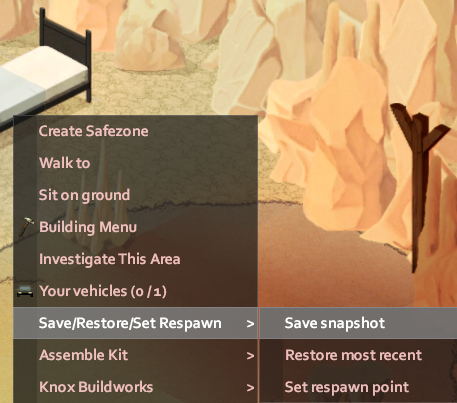
If you've died and respawned, you can Restore your build from the last savepoint by right clicking on any bed, use "Save/Restore/Set Respawn" and click "Restore Most Recent"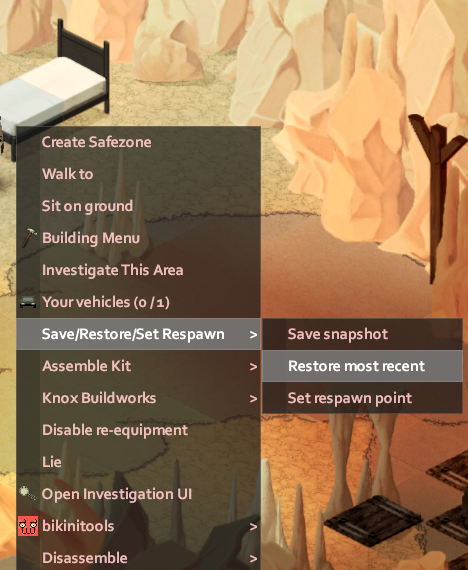
Spawn Points
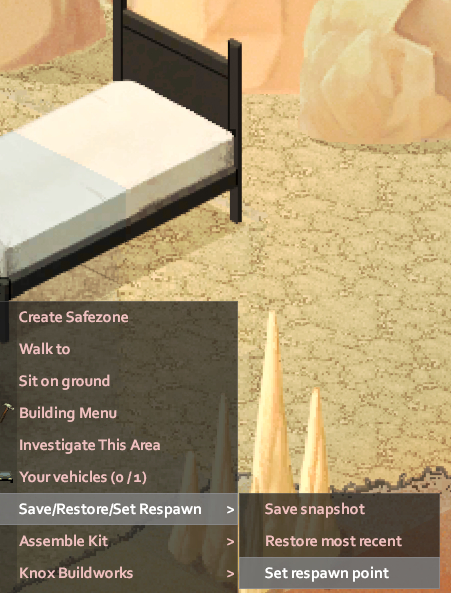
Setting your spawn point uses the same system. Right click on any bed, click "Save/Restore/Set Respawn" and click "Set Respawn Point":