Every recorded change to this guide, oldest changes drop off after 50 entries.
When
Action
By
What changed
Edited
Milo
View changes
Before
Wasteland Safezone mod guide
Big thanks to WastelandRP for allowing us to modify and use their safezone mod as well as many of their mods
Safezones let you claim an area and control membership.
Where can I create a safezone?
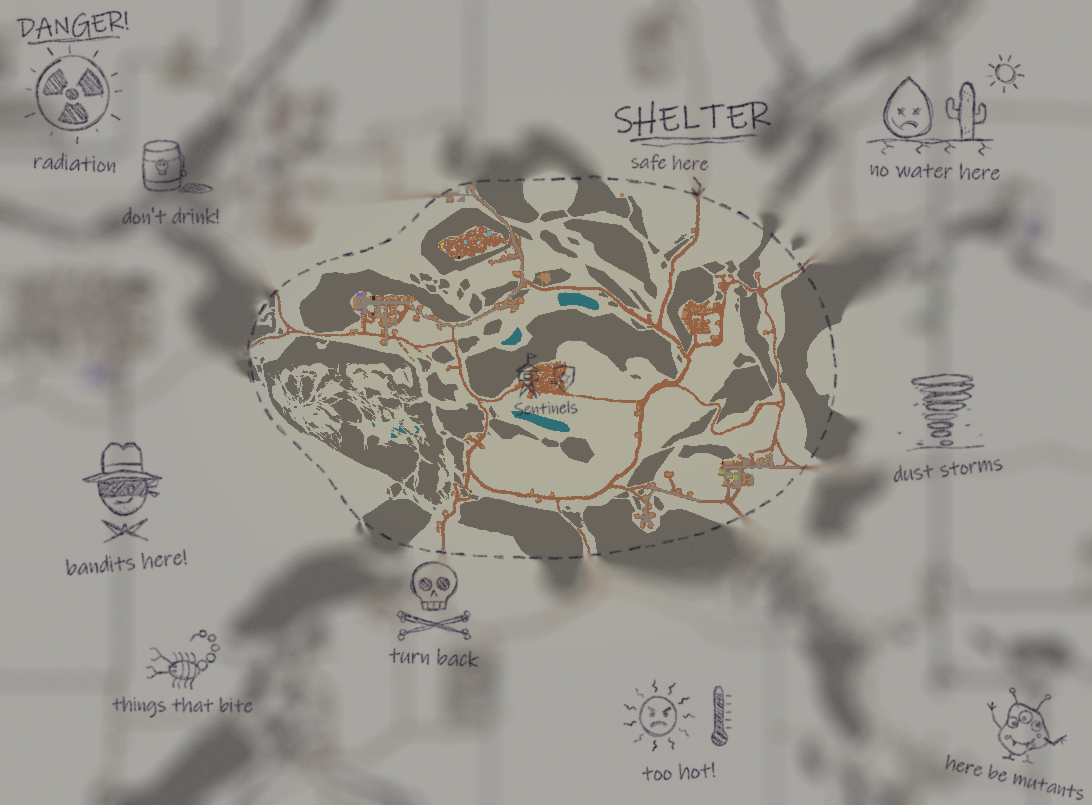
The safest area to safezone is in Shelter Valley:
The surrounding Deadlands are too inhospitable for permanent settlement. Characters may establish temporary camps, bases, or outposts there, but they should not be treated as places where people can safely live for weeks at a time. You may well be plagued with bandits, sandstorms, hordes and lack of water.
Create a safezone
Right click in the world and choose Create Safezone to draw a custom claim. You can also choose Claim Safehouse on an eligible building - this opens the Safezone Creator with that building's area selected.
Enter a name and check the selected area. The highlight and message under the name show whether the selection is valid. When it is ready, choose Create Safezone. The management window automatically opens after creating the claim.
Your area may be up to 25 tiles wide and 25 tiles long, with a maximum span of 3 z-levels. Be reasonable with the area you claim. You cannot partially overlap an existing safezone or draw a new one around another. A nested claim must fit completely inside a safezone you own.
Find and manage your safezones
While standing inside one, right click and choose Safezone: -> Show Info. If you are not a member, that menu offers Request Membership instead.
Right click and open My Safezones to see zones where you are a member, even when you are elsewhere.
The management window shows your membership. Depending on your role, it also lets you leave or change the zone. Officers and owners can use the Members tab.
Members and access
Owners can manage the claim. Officers can help manage members. Regular members can use the safezone - visitors who are not members may see a Safezone: No Permission notice and have certain item and world interactions blocked.
To join a zone, stand inside it and choose Safezone: -> Request Membership from the right click menu. An online zone manager can approve or reject the request. They may also grant membership for a limited time.
An owner or officer can add a member directly in the Members tab. Members can leave from Overview. If an owner leaves, ownership may pass to an eligible officer; if there is no eligible successor, the zone can be deleted, so read the confirmation carefully.
Expiration and help
Owners and officers visits refresh the zone's last-visit time. Safezone claim expires after 7 days without a visit. Timed memberships expire at their assigned time.
If a new zone is missing from a menu, wait for the server response and reopen the right click menu. Reconnect if it is still missing.
Where can I safehouse?
The Shelter Valley is the safest place to safehouse. While mechanically, you may safehouse outside of the Shelter Valley you may be met with hordes, sandstorms, radiation and a severe lack of water.
Out of Bounds
You may not go or safehouse outside of the natural barriers surrounding the area. Attempting to build, destroy or otherwise exit through those natural barriers will result in the death of your character and a ban.
After
Wasteland Safezone mod guide
Big thanks to WastelandRP for allowing us to modify and use their safezone mod as well as many of their mods
Safezones let you claim an area and control membership.
Where can I create a safezone?
The safest area to safezone is in Shelter Valley:
The surrounding Deadlands are too inhospitable for permanent settlement. Characters may establish temporary camps, bases, or outposts there, but they should not be treated as places where people can safely live for weeks at a time. You may well be plagued with bandits, sandstorms, hordes and lack of water.
Create a safezone
Right click in the world and choose Create Safezone to draw a custom claim. You can also choose Claim Safehouse on an eligible building - this opens the Safezone Creator with that building's area selected.
Enter a name and check the selected area. The highlight and message under the name show whether the selection is valid. When it is ready, choose Create Safezone. The management window automatically opens after creating the claim.
Your area may be up to 20 tiles wide and 20 tiles long, with a maximum span of 3 z-levels. Be reasonable with the area you claim. You cannot partially overlap an existing safezone or draw a new one around another. A nested claim must fit completely inside a safezone you own.
Find and manage your safezones
While standing inside one, right click and choose Safezone: -> Show Info. If you are not a member, that menu offers Request Membership instead.
Right click and open My Safezones to see zones where you are a member, even when you are elsewhere.
The management window shows your membership. Depending on your role, it also lets you leave or change the zone. Officers and owners can use the Members tab.
Members and access
Owners can manage the claim. Officers can help manage members. Regular members can use the safezone - visitors who are not members may see a Safezone: No Permission notice and have certain item and world interactions blocked.
To join a zone, stand inside it and choose Safezone: -> Request Membership from the right click menu. An online zone manager can approve or reject the request. They may also grant membership for a limited time.
An owner or officer can add a member directly in the Members tab. Members can leave from Overview. If an owner leaves, ownership may pass to an eligible officer; if there is no eligible successor, the zone can be deleted, so read the confirmation carefully.
Expiration and help
Owners and officers visits refresh the zone's last-visit time. Safezone claim expires after 7 days without a visit. Timed memberships expire at their assigned time.
If a new zone is missing from a menu, wait for the server response and reopen the right click menu. Reconnect if it is still missing.
Where can I safehouse?
The Shelter Valley is the safest place to safehouse. While mechanically, you may safehouse outside of the Shelter Valley you may be met with hordes, sandstorms, radiation and a severe lack of water.
Out of Bounds
You may not go or safehouse outside of the natural barriers surrounding the area. Attempting to build, destroy or otherwise exit through those natural barriers will result in the death of your character and a ban.
Edited
idleSatire
View changes
Title: How do I claim and manage a safehouse - Safezone mod → Safehouses
Before
Wasteland Safezone mod guide
Big thanks to WastelandRP for allowing us to modify and use their safezone mod as well as many of their mods
Safezones let you claim an area and control membership.
Where can I create a safezone?
Mechanical safezones may only be created inside Shelter Valley.
The surrounding Deadlands are too inhospitable for permanent settlement. Characters may establish temporary camps, bases, or outposts there, but they should not be treated as places where people can safely live for weeks at a time.
Create a safezone
Right click in the world and choose Create Safezone to draw a custom claim. You can also choose Claim Safehouse on an eligible building - this opens the Safezone Creator with that building's area selected.
Enter a name and check the selected area. The highlight and message under the name show whether the selection is valid. When it is ready, choose Create Safezone. The management window automatically opens after creating the claim.
Your area may be up to 25 tiles wide and 25 tiles long, with a maximum span of 3 z-levels. Be reasonable with the area you claim. You cannot partially overlap an existing safezone or draw a new one around another. A nested claim must fit completely inside a safezone you own.
Find and manage your safezones
While standing inside one, right click and choose Safezone: -> Show Info. If you are not a member, that menu offers Request Membership instead.
Right click and open My Safezones to see zones where you are a member, even when you are elsewhere.
The management window shows your membership. Depending on your role, it also lets you leave or change the zone. Officers and owners can use the Members tab.
Members and access
Owners can manage the claim. Officers can help manage members. Regular members can use the safezone - visitors who are not members may see a Safezone: No Permission notice and have certain item and world interactions blocked.
To join a zone, stand inside it and choose Safezone: -> Request Membership from the right click menu. An online zone manager can approve or reject the request. They may also grant membership for a limited time.
An owner or officer can add a member directly in the Members tab. Members can leave from Overview. If an owner leaves, ownership may pass to an eligible officer; if there is no eligible successor, the zone can be deleted, so read the confirmation carefully.
Expiration and help
Owners and officers visits refresh the zone's last-visit time. Safezone claim expires after 7 days without a visit. Timed memberships expire at their assigned time.
If a new zone is missing from a menu, wait for the server response and reopen the right click menu. Reconnect if it is still missing.
Where can I safehouse?
The Shelter Valley is the safest place to safehouse. While mechanically, you may safehouse outside of the Shelter Valley you may be met with hordes, sandstorms, radiation and a severe lack of water.
Out of Bounds
You may not go or safehouse outside of the natural barriers surrounding the area. Attempting to build, destroy or otherwise exit through those natural barriers will result in the death of your character and a ban.
After
Wasteland Safezone mod guide
Big thanks to WastelandRP for allowing us to modify and use their safezone mod as well as many of their mods
Safezones let you claim an area and control membership.
Where can I create a safezone?
The safest area to safezone is in Shelter Valley:
The surrounding Deadlands are too inhospitable for permanent settlement. Characters may establish temporary camps, bases, or outposts there, but they should not be treated as places where people can safely live for weeks at a time. You may well be plagued with bandits, sandstorms, hordes and lack of water.
Create a safezone
Right click in the world and choose Create Safezone to draw a custom claim. You can also choose Claim Safehouse on an eligible building - this opens the Safezone Creator with that building's area selected.
Enter a name and check the selected area. The highlight and message under the name show whether the selection is valid. When it is ready, choose Create Safezone. The management window automatically opens after creating the claim.
Your area may be up to 25 tiles wide and 25 tiles long, with a maximum span of 3 z-levels. Be reasonable with the area you claim. You cannot partially overlap an existing safezone or draw a new one around another. A nested claim must fit completely inside a safezone you own.
Find and manage your safezones
While standing inside one, right click and choose Safezone: -> Show Info. If you are not a member, that menu offers Request Membership instead.
Right click and open My Safezones to see zones where you are a member, even when you are elsewhere.
The management window shows your membership. Depending on your role, it also lets you leave or change the zone. Officers and owners can use the Members tab.
Members and access
Owners can manage the claim. Officers can help manage members. Regular members can use the safezone - visitors who are not members may see a Safezone: No Permission notice and have certain item and world interactions blocked.
To join a zone, stand inside it and choose Safezone: -> Request Membership from the right click menu. An online zone manager can approve or reject the request. They may also grant membership for a limited time.
An owner or officer can add a member directly in the Members tab. Members can leave from Overview. If an owner leaves, ownership may pass to an eligible officer; if there is no eligible successor, the zone can be deleted, so read the confirmation carefully.
Expiration and help
Owners and officers visits refresh the zone's last-visit time. Safezone claim expires after 7 days without a visit. Timed memberships expire at their assigned time.
If a new zone is missing from a menu, wait for the server response and reopen the right click menu. Reconnect if it is still missing.
Where can I safehouse?
The Shelter Valley is the safest place to safehouse. While mechanically, you may safehouse outside of the Shelter Valley you may be met with hordes, sandstorms, radiation and a severe lack of water.
Out of Bounds
You may not go or safehouse outside of the natural barriers surrounding the area. Attempting to build, destroy or otherwise exit through those natural barriers will result in the death of your character and a ban.
Edited
idleSatire
View changes
Before
Wasteland Safezone mod guide
Big thanks to WastelandRP for allowing us to modify and use their safezone mod as well as many of their mods
Safezones let you claim an area and control membership.
Where can I create a safezone?
Mechanical safezones may only be created inside Shelter Valley.
The surrounding Deadlands are too inhospitable for permanent settlement. Characters may establish temporary camps, bases, or outposts there, but they should not be treated as places where people can safely live for weeks at a time.
Create a safezone
Right click in the world and choose Create Safezone to draw a custom claim. You can also choose Claim Safehouse on an eligible building - this opens the Safezone Creator with that building's area selected.
Enter a name and check the selected area. The highlight and message under the name show whether the selection is valid. When it is ready, choose Create Safezone. The management window automatically opens after creating the claim.
Your area may be up to 25 tiles wide and 25 tiles long, with a maximum span of 3 z-levels. Be reasonable with the area you claim. You cannot partially overlap an existing safezone or draw a new one around another. A nested claim must fit completely inside a safezone you own.
Find and manage your safezones
While standing inside one, right click and choose Safezone: -> Show Info. If you are not a member, that menu offers Request Membership instead.
Right click and open My Safezones to see zones where you are a member, even when you are elsewhere.
The management window shows your membership. Depending on your role, it also lets you leave or change the zone. Officers and owners can use the Members tab.
Members and access
Owners can manage the claim. Officers can help manage members. Regular members can use the safezone - visitors who are not members may see a Safezone: No Permission notice and have certain item and world interactions blocked.
To join a zone, stand inside it and choose Safezone: -> Request Membership from the right click menu. An online zone manager can approve or reject the request. They may also grant membership for a limited time.
An owner or officer can add a member directly in the Members tab. Members can leave from Overview. If an owner leaves, ownership may pass to an eligible officer; if there is no eligible successor, the zone can be deleted, so read the confirmation carefully.
Expiration and help
Owners and officers visits refresh the zone's last-visit time. Safezone claim expires after 7 days without a visit. Timed memberships expire at their assigned time.
If a new zone is missing from a menu, wait for the server response and reopen the right click menu. Reconnect if it is still missing.
After
Wasteland Safezone mod guide
Big thanks to WastelandRP for allowing us to modify and use their safezone mod as well as many of their mods
Safezones let you claim an area and control membership.
Where can I create a safezone?
Mechanical safezones may only be created inside Shelter Valley.
The surrounding Deadlands are too inhospitable for permanent settlement. Characters may establish temporary camps, bases, or outposts there, but they should not be treated as places where people can safely live for weeks at a time.
Create a safezone
Right click in the world and choose Create Safezone to draw a custom claim. You can also choose Claim Safehouse on an eligible building - this opens the Safezone Creator with that building's area selected.
Enter a name and check the selected area. The highlight and message under the name show whether the selection is valid. When it is ready, choose Create Safezone. The management window automatically opens after creating the claim.
Your area may be up to 25 tiles wide and 25 tiles long, with a maximum span of 3 z-levels. Be reasonable with the area you claim. You cannot partially overlap an existing safezone or draw a new one around another. A nested claim must fit completely inside a safezone you own.
Find and manage your safezones
While standing inside one, right click and choose Safezone: -> Show Info. If you are not a member, that menu offers Request Membership instead.
Right click and open My Safezones to see zones where you are a member, even when you are elsewhere.
The management window shows your membership. Depending on your role, it also lets you leave or change the zone. Officers and owners can use the Members tab.
Members and access
Owners can manage the claim. Officers can help manage members. Regular members can use the safezone - visitors who are not members may see a Safezone: No Permission notice and have certain item and world interactions blocked.
To join a zone, stand inside it and choose Safezone: -> Request Membership from the right click menu. An online zone manager can approve or reject the request. They may also grant membership for a limited time.
An owner or officer can add a member directly in the Members tab. Members can leave from Overview. If an owner leaves, ownership may pass to an eligible officer; if there is no eligible successor, the zone can be deleted, so read the confirmation carefully.
Expiration and help
Owners and officers visits refresh the zone's last-visit time. Safezone claim expires after 7 days without a visit. Timed memberships expire at their assigned time.
If a new zone is missing from a menu, wait for the server response and reopen the right click menu. Reconnect if it is still missing.
Where can I safehouse?
The Shelter Valley is the safest place to safehouse. While mechanically, you may safehouse outside of the Shelter Valley you may be met with hordes, sandstorms, radiation and a severe lack of water.
Out of Bounds
You may not go or safehouse outside of the natural barriers surrounding the area. Attempting to build, destroy or otherwise exit through those natural barriers will result in the death of your character and a ban.
Edited
Milo
View changes
Before
Wasteland Safezone mod guide
Big thanks to WastelandRP for allowing us to modify and use their safezone mod as well as many of their mods
Safezones let you claim an area and control membership.
Create a safezone
Right click in the world and choose Create Safezone to draw a custom claim. You can also choose Claim Safehouse on an eligible building - this opens the Safezone Creator with that building's area selected.
Enter a name and check the selected area. The highlight and message under the name show whether the selection is valid. When it is ready, choose Create Safezone. The management window automatically opens after creating the claim.
Your area may be up to 25 tiles wide and 25 tiles long, with a maximum span of 3 z-levels. Be reasonable with the area you claim. You cannot partially overlap an existing safezone or draw a new one around another. A nested claim must fit completely inside a safezone you own.
Find and manage your safezones
While standing inside one, right click and choose Safezone: -> Show Info. If you are not a member, that menu offers Request Membership instead.
Right click and open My Safezones to see zones where you are a member, even when you are elsewhere.
The management window shows your membership. Depending on your role, it also lets you leave or change the zone. Officers and owners can use the Members tab.
Members and access
Owners can manage the claim. Officers can help manage members. Regular members can use the safezone - visitors who are not members may see a Safezone: No Permission notice and have certain item and world interactions blocked.
To join a zone, stand inside it and choose Safezone: -> Request Membership from the right click menu. An online zone manager can approve or reject the request. They may also grant membership for a limited time.
An owner or officer can add a member directly in the Members tab. Members can leave from Overview. If an owner leaves, ownership may pass to an eligible officer; if there is no eligible successor, the zone can be deleted, so read the confirmation carefully.
Expiration and help
Owners and officers visits refresh the zone's last-visit time. Safezone claim expires after 7 days without a visit. Timed memberships expire at their assigned time.
If a new zone is missing from a menu, wait for the server response and reopen the right click menu. Reconnect if it is still missing.
After
Wasteland Safezone mod guide
Big thanks to WastelandRP for allowing us to modify and use their safezone mod as well as many of their mods
Safezones let you claim an area and control membership.
Where can I create a safezone?
Mechanical safezones may only be created inside Shelter Valley.
The surrounding Deadlands are too inhospitable for permanent settlement. Characters may establish temporary camps, bases, or outposts there, but they should not be treated as places where people can safely live for weeks at a time.
Create a safezone
Right click in the world and choose Create Safezone to draw a custom claim. You can also choose Claim Safehouse on an eligible building - this opens the Safezone Creator with that building's area selected.
Enter a name and check the selected area. The highlight and message under the name show whether the selection is valid. When it is ready, choose Create Safezone. The management window automatically opens after creating the claim.
Your area may be up to 25 tiles wide and 25 tiles long, with a maximum span of 3 z-levels. Be reasonable with the area you claim. You cannot partially overlap an existing safezone or draw a new one around another. A nested claim must fit completely inside a safezone you own.
Find and manage your safezones
While standing inside one, right click and choose Safezone: -> Show Info. If you are not a member, that menu offers Request Membership instead.
Right click and open My Safezones to see zones where you are a member, even when you are elsewhere.
The management window shows your membership. Depending on your role, it also lets you leave or change the zone. Officers and owners can use the Members tab.
Members and access
Owners can manage the claim. Officers can help manage members. Regular members can use the safezone - visitors who are not members may see a Safezone: No Permission notice and have certain item and world interactions blocked.
To join a zone, stand inside it and choose Safezone: -> Request Membership from the right click menu. An online zone manager can approve or reject the request. They may also grant membership for a limited time.
An owner or officer can add a member directly in the Members tab. Members can leave from Overview. If an owner leaves, ownership may pass to an eligible officer; if there is no eligible successor, the zone can be deleted, so read the confirmation carefully.
Expiration and help
Owners and officers visits refresh the zone's last-visit time. Safezone claim expires after 7 days without a visit. Timed memberships expire at their assigned time.
If a new zone is missing from a menu, wait for the server response and reopen the right click menu. Reconnect if it is still missing.
Published
idleSatire
—
Edited
Milo
View changes
Before
Wasteland Safezone mod guide
Big thanks to WastelandRP for allowing us to modify and use their safezone mod as well as many of their mods
Safezones let you claim an area and control membership.
Create a safezone
Right click in the world and choose Create Safezone to draw a custom claim. You can also choose Claim Safehouse on an eligible building - this opens the Safezone Creator with that building's area selected.
Enter a name and check the selected area. The highlight and message under the name show whether the selection is valid. When it is ready, choose Create Safezone. The management window automatically opens after creating the claim.
Your area may be up to 25 tiles wide and 25 tiles long, with a maximum span of 3 z-levels. You cannot partially overlap an existing safezone or draw a new one around another. A nested claim must fit completely inside a safezone you own.
Find and manage your safezones
While standing inside one, right click and choose Safezone: -> Show Info. If you are not a member, that menu offers Request Membership instead.
Right click and open My Safezones to see zones where you are a member, even when you are elsewhere.
The management window shows your membership. Depending on your role, it also lets you leave or change the zone. Officers and owners can use the Members tab.
Members and access
Owners can manage the claim. Officers can help manage members. Regular members can use the safezone - visitors who are not members may see a Safezone: No Permission notice and have certain item and world interactions blocked.
To join a zone, stand inside it and choose Safezone: → Request Membership from the right click menu. An online zone manager can approve or reject the request. They may also grant membership for a limited time.
An owner or officer can add a member directly in the Members tab. Members can leave from Overview. If an owner leaves, ownership may pass to an eligible officer; if there is no eligible successor, the zone can be deleted, so read the confirmation carefully.
Expiration and help
Member visits refresh the zone's last-visit time. Safezone claim expires after 7 days without a member visit. Timed memberships expire at their assigned time.
If a new zone is missing from a menu, wait for the server response and reopen the right click menu. Reconnect if it is still missing.
After
Wasteland Safezone mod guide
Big thanks to WastelandRP for allowing us to modify and use their safezone mod as well as many of their mods
Safezones let you claim an area and control membership.
Create a safezone
Right click in the world and choose Create Safezone to draw a custom claim. You can also choose Claim Safehouse on an eligible building - this opens the Safezone Creator with that building's area selected.
Enter a name and check the selected area. The highlight and message under the name show whether the selection is valid. When it is ready, choose Create Safezone. The management window automatically opens after creating the claim.
Your area may be up to 25 tiles wide and 25 tiles long, with a maximum span of 3 z-levels. Be reasonable with the area you claim. You cannot partially overlap an existing safezone or draw a new one around another. A nested claim must fit completely inside a safezone you own.
Find and manage your safezones
While standing inside one, right click and choose Safezone: -> Show Info. If you are not a member, that menu offers Request Membership instead.
Right click and open My Safezones to see zones where you are a member, even when you are elsewhere.
The management window shows your membership. Depending on your role, it also lets you leave or change the zone. Officers and owners can use the Members tab.
Members and access
Owners can manage the claim. Officers can help manage members. Regular members can use the safezone - visitors who are not members may see a Safezone: No Permission notice and have certain item and world interactions blocked.
To join a zone, stand inside it and choose Safezone: -> Request Membership from the right click menu. An online zone manager can approve or reject the request. They may also grant membership for a limited time.
An owner or officer can add a member directly in the Members tab. Members can leave from Overview. If an owner leaves, ownership may pass to an eligible officer; if there is no eligible successor, the zone can be deleted, so read the confirmation carefully.
Expiration and help
Owners and officers visits refresh the zone's last-visit time. Safezone claim expires after 7 days without a visit. Timed memberships expire at their assigned time.
If a new zone is missing from a menu, wait for the server response and reopen the right click menu. Reconnect if it is still missing.
Edited
Milo
View changes
Before
Wasteland Safezone mod guide
Big thanks to WastelandRP for allowing us to modify and use their safezone mod as well asmany of their mods
Safezones let you claim an area and control membership. Nonmembers may be blocked from certain actions inside a claim.
Create a safezone
Right click in the world and choose Create Safezone to draw a custom claim. You can also choose Claim Safehouse on an eligible building - this opens the Safezone Creator with that building's area selected.
Enter a name and check the selected area. The highlight and message under the name show whether the selection is valid. When it is ready, choose Create Safezone. The management window automatically opens after creating the claim.
Your area may be up to 25 tiles wide and 25 tiles long, with a maximum span of 3 z-levels. You cannot partially overlap an existing safezone or draw a new one around another. A nested claim must fit completely inside a safezone you own.
Find and manage your safezones
While standing inside one, right click and choose Safezone: -> Show Info. If you are not a member, that menu offers Request Membership instead.
Right click and open My Safezones to see zones where you are a member, even when you are elsewhere.
The management window shows your membership. Depending on your role, it also lets you leave or change the zone. Officers and owners can use the Members tab.
Members and access
Owners can manage the claim. Officers can help manage members. Regular members can use the safezone - visitors who are not members may see a Safezone: No Permission notice and have certain item and world interactions blocked.
To join a zone, stand inside it and choose Safezone: → Request Membership from the right click menu. An online zone manager can approve or reject the request. They may also grant membership for a limited time.
An owner or officer can add a member directly in the Members tab. Members can leave from Overview. If an owner leaves, ownership may pass to an eligible officer; if there is no eligible successor, the zone can be deleted, so read the confirmation carefully.
Expiration and help
Member visits refresh the zone's last-visit time. Safezone claim expires after 7 days without a member visit. Timed memberships expire at their assigned time.
If a new zone is missing from a menu, wait for the server response and reopen the right click menu. Reconnect if it is still missing.
After
Wasteland Safezone mod guide
Big thanks to WastelandRP for allowing us to modify and use their safezone mod as well as many of their mods
Safezones let you claim an area and control membership.
Create a safezone
Right click in the world and choose Create Safezone to draw a custom claim. You can also choose Claim Safehouse on an eligible building - this opens the Safezone Creator with that building's area selected.
Enter a name and check the selected area. The highlight and message under the name show whether the selection is valid. When it is ready, choose Create Safezone. The management window automatically opens after creating the claim.
Your area may be up to 25 tiles wide and 25 tiles long, with a maximum span of 3 z-levels. You cannot partially overlap an existing safezone or draw a new one around another. A nested claim must fit completely inside a safezone you own.
Find and manage your safezones
While standing inside one, right click and choose Safezone: -> Show Info. If you are not a member, that menu offers Request Membership instead.
Right click and open My Safezones to see zones where you are a member, even when you are elsewhere.
The management window shows your membership. Depending on your role, it also lets you leave or change the zone. Officers and owners can use the Members tab.
Members and access
Owners can manage the claim. Officers can help manage members. Regular members can use the safezone - visitors who are not members may see a Safezone: No Permission notice and have certain item and world interactions blocked.
To join a zone, stand inside it and choose Safezone: → Request Membership from the right click menu. An online zone manager can approve or reject the request. They may also grant membership for a limited time.
An owner or officer can add a member directly in the Members tab. Members can leave from Overview. If an owner leaves, ownership may pass to an eligible officer; if there is no eligible successor, the zone can be deleted, so read the confirmation carefully.
Expiration and help
Member visits refresh the zone's last-visit time. Safezone claim expires after 7 days without a member visit. Timed memberships expire at their assigned time.
If a new zone is missing from a menu, wait for the server response and reopen the right click menu. Reconnect if it is still missing.
Edited
Milo
View changes
Title: Untitled Guide → How do I claim and manage a safehouse - Safezone mod
Before
After
Wasteland Safezone mod guide
Big thanks to WastelandRP for allowing us to modify and use their safezone mod as well asmany of their mods
Safezones let you claim an area and control membership. Nonmembers may be blocked from certain actions inside a claim.
Create a safezone
Right click in the world and choose Create Safezone to draw a custom claim. You can also choose Claim Safehouse on an eligible building - this opens the Safezone Creator with that building's area selected.
Enter a name and check the selected area. The highlight and message under the name show whether the selection is valid. When it is ready, choose Create Safezone. The management window automatically opens after creating the claim.
Your area may be up to 25 tiles wide and 25 tiles long, with a maximum span of 3 z-levels. You cannot partially overlap an existing safezone or draw a new one around another. A nested claim must fit completely inside a safezone you own.
Find and manage your safezones
While standing inside one, right click and choose Safezone: -> Show Info. If you are not a member, that menu offers Request Membership instead.
Right click and open My Safezones to see zones where you are a member, even when you are elsewhere.
The management window shows your membership. Depending on your role, it also lets you leave or change the zone. Officers and owners can use the Members tab.
Members and access
Owners can manage the claim. Officers can help manage members. Regular members can use the safezone - visitors who are not members may see a Safezone: No Permission notice and have certain item and world interactions blocked.
To join a zone, stand inside it and choose Safezone: → Request Membership from the right click menu. An online zone manager can approve or reject the request. They may also grant membership for a limited time.
An owner or officer can add a member directly in the Members tab. Members can leave from Overview. If an owner leaves, ownership may pass to an eligible officer; if there is no eligible successor, the zone can be deleted, so read the confirmation carefully.
Expiration and help
Member visits refresh the zone's last-visit time. Safezone claim expires after 7 days without a member visit. Timed memberships expire at their assigned time.
If a new zone is missing from a menu, wait for the server response and reopen the right click menu. Reconnect if it is still missing.